TL’DNR:
Introduction into Meshtastic/Meshcore, hardware recommendations, first steps. If you get 2 devices, you can already play. Depending on where in the world you are, you might see much Meshtastic/Meshcore used, or none at all. Meshtastic seems much more widely spread than Meshcore.
Terms
- LoRa (“Long Range”) is a technology for transmitting data via radio signals. It’s designed for much longer distances than Wifi: the record for LoRa is around 300km, and typical distance 10km. Downsides: less throughput than Wifi, and higher latency. LoRa defines various profiles, these allow to fine tune latency/ throughput versus distance of the participating stations.
- Meshtastic is an OpenSource firmware, designed to run on a variety of devices. Meshtastic implements a mesh network, so even if participating nodes can not reach each other directly via radio, they can exchange data via nodes in the middle.
- Meshcore is an alternative to Meshtastic, with different pros and cons
What do you get from playing with Meshtastic/Meshcore?
LoRa devices, together with Meshtastic or Meshcore can communicate with each other. Some of the most common goals of people playing with these:
- To establish a way of communication alternative to the internet. I’ve seen areas in Germany with high density of Meshtastic devices, and active communication in chat channels: people greeting each other in the morning, and so on. So usage as public medium for communication, a bit like Citizens Band (CB) radio.
- People using LoRa devices to regularly transmit data for home use: this might be temperature data from a sensor which is deployed in a distance not covered by Wifi any more. Or turning a water pump on/off.
- There are also fun projects with people connecting retro computers like Commodore64 to LoRa hardware, and with that establishing a “chat channel” where all of their computers can communicate together
- For range testing, trying to transmit over as big distances as possible. If this sounds interesting to you, you might also consider HAM radio as a hobby. :)
Recommended hardware
The first guardrails for hardware are set by the used frequencies, which depend on the country where you want to use Meshtastic/Meshcore. I’ve purchased devices for Germany and Japan:
- Europe (including Germany) is allowing the 868Mhz band (863-870MHz) for LoRa, I use Heltec LoRa32 V3 devices here.
- Japan is allowing the 920-925Mhz range, that’s also covered by the devices from above.
- Additionally, 433Mhz area is used in Germany: the HAM radio group in my home town is operating Meshtastic gear in that frequency range, and Heltec LoRa32 V3 also for 433Mhz are available.
I bought 4 Heltec devices for 868/923Mhz use, and one for 433Mhz. Having 2 or more of a kind is recommended, so you can test the communication without relying on other nodes.
The Heltec are cheap, but also have a reputation of wasting energy - when providing power from batteries that’s important. The more expensive but power saving alternative is the RAK 4631 module, including nRF52840 with SX1262-LoRa-Modem. That’s a modular system, for use with Meshtastic you need to purchase multiple components and combine them.
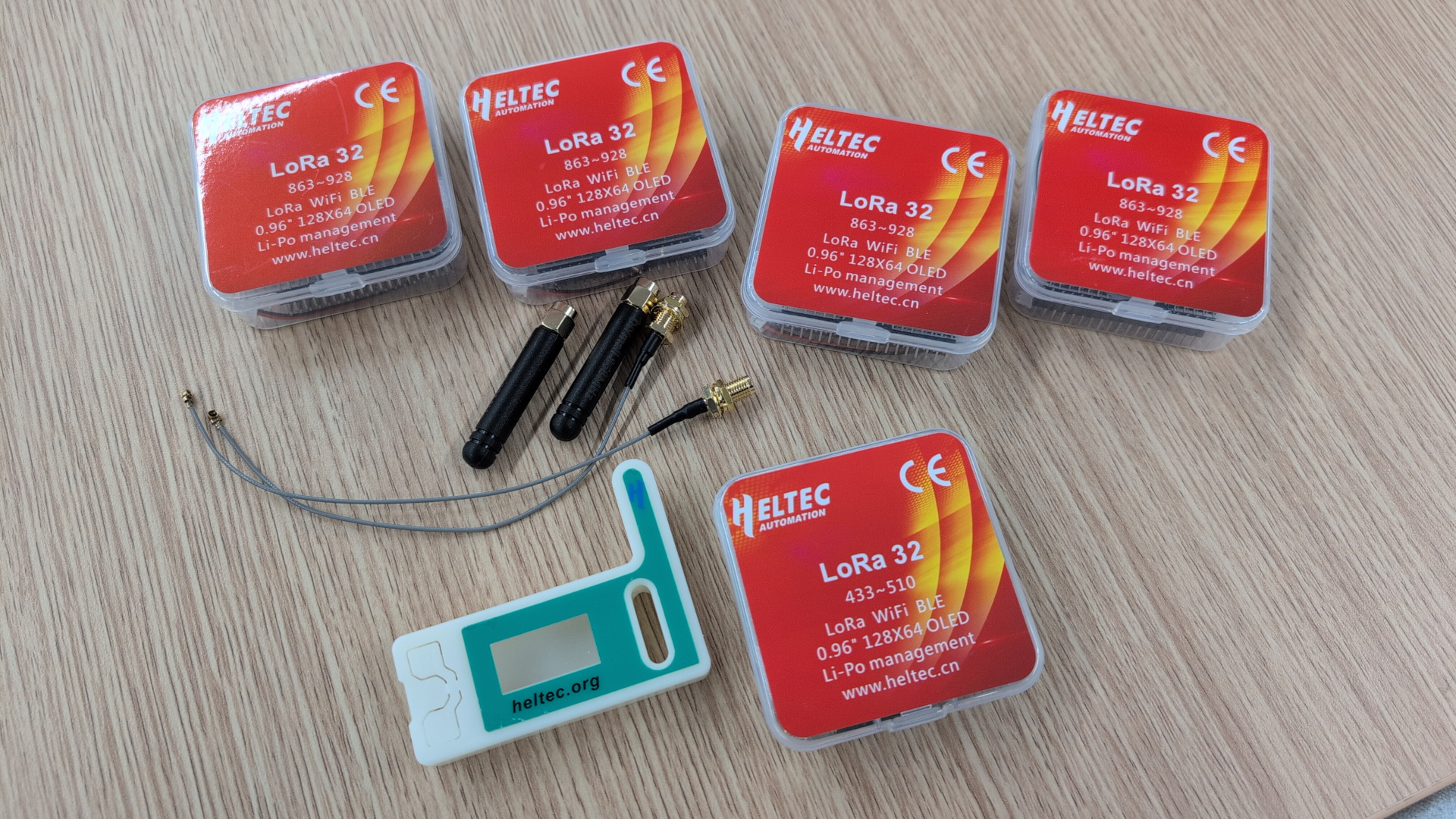
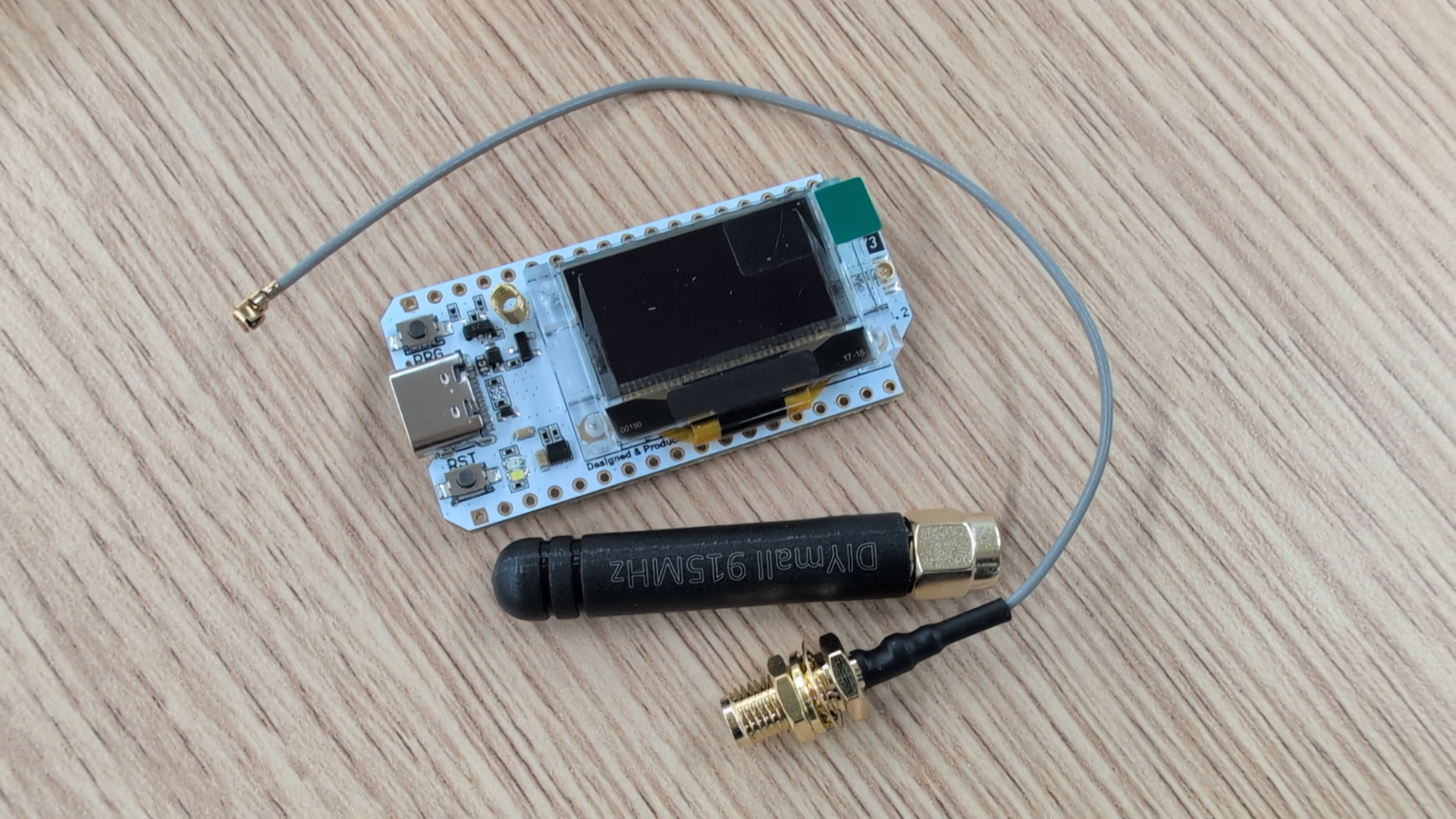
Note: I connected the antennas which were labeled for use on 868Mhz and 923Mhz area to a NanoVNA-v4: turns out they are completely unfit for the 923Mhz area, with an SWR over 5. The NanoVNA might be to expensive for purchasing just for this check, but if you have a HAM club in your area, ask for help for this check!
Initial Setup w/ Meshtastic
I spent 30min trying to do something useful with the default software of the Heltec devices, installed the Arduino software suite, but gave up and flashed Meshtastic onto the devices. The Meshtastic site is great for that, flashing can happen from the Linux command line, or with a Chrome browser.
Communication with the Heltec devices is possible via:
- Wifi: I did not try that
- Bluetooth: via the Meshtastic app, on Android or iphone
- serial via USB-C
Bluetooth communication via Meshtastic app is simplest for beginners, navigating the menus is easier than looking up command line options. For command line access on Debian 12 system, this can be used:
sudo apt update
sudo apt install python3-full

python3 --version
pip3 --version
The user should then be added to the group ‘dialout’, to get access to the Heltec. Then I connect the Heltec via USB-C to the system, and continue:
cd ~
python3 -m venv meshtastic
export PATH="~/meshtastic/bin/:$PATH"
pip3 install --upgrade esptool
pip3 install --upgrade pytap2
pip3 install --upgrade meshtastic
pip3 install --upgrade esptool

# This does a first communication
esptool chip-id

# Flash firmware via webflasher and Chrome browser, or
# get firmware from https://meshtastic.org/downloads/
./device-install.sh -f firmware-heltec-v3-2.6.11.60ec05e.bin
Now we need to tell the configure the device for our region:
# for Japan:
meshtastic --set lora.region JP
# for Europe, 868 range:
meshtastic --set lora.region EU_868

meshtastic --get lora
meshtastic --get lora.region
meshtastic --get 0
If we did all of this also on the other Heltec, we can now connect power to the devices, and if they are within range, they will “see” each other as peers, we can send messages. For message transmission, one node should be listening via “meshtastic –reply” and the other node should send via “–sendtext”:
meshtastic --nodes
meshtastic --sendtext 'Hello Mesh!'
meshtastic --reply
With this, message exchange should work! For connexting to the device with the Android mestastic app via Bluetooth, let’s also set the pin:
meshtastic --set bluetooth.fixed_pin <some-pin-here>
meshtastic --set bluetooth.mode FIXED_PIN
It is also recommended to set the position of the LoRa device, and set a proper device name:
meshtastic --set-owner 'CHtastic1' --set-owner-short CHT1
meshtastic --set position.fixed_position true --setlat 37.8651 --setlon -119.5383
Meshcore
Meshcore is an alternative to Meshtastic. Quite active project, quickly getting traction, but right now there are much more Meshtastic nodes than Meshcore nodes. While Meshtastic is forming for mesh network for you, Meshcore is more bare bones: leaving it to you to have the device send out “advertisements”, to configure routes to other nodes and so on. The idea is that you get more stable routes and operation. Also Meshcore supports the Heltec V3 devices, and has an Android app.
Command line client setup:
sudo apt update
sudo apt install python3-full

cd ~
python3 -m venv meshcore
export PATH="~/meshcore/bin/:$PATH"
echo 'export PATH="~/meshcore/bin/:$PATH"' >>~/.bashrc

# Now flash firmware, i.e. with the Chrome browser
pip3 install --upgrade pytap2
pip3 install --upgrade meshcore-cli

# https://github.com/meshcore-dev/meshcore-cli
meshcore-cli -l
meshcore-cli -s /dev/ttyUSB2 info
First commands:
$ meshcli -s /dev/ttyUSB0 chat
clock
clock sync
set lat [..]    // set your position, Latitude
set lon [..]    // set your position, Longitude
get name
set name
get radio
set radio 869.618,62.5,8,8
# Setting the mode/freq. of neighbouring nodes in Germany.
# example: 869.525,250.0,11,5 // this is the default
# requires reboot
advert
floodadv
node_discover
public hi world
list
Here is a nice map with Meshcore nodes. I noticed that the nodes around me were all operating with different settings than the Meshcore defaults, so above ‘set radio’ is configuring the special settings.
Practical operation, Japan
After initial setup and testing transmission between my own devices, I was running one device for some time at my flat in Tokyo, without seeing other nodes. The house is a big metal frame, but also with the antenna outside the balcony no other nodes were seen. I also took the device to a day trip to Mnt.Nabewaliyama: connected via USB-C to the Pixel9 with GrapheneOS, the Pixel9 is providing the power and can control the Helvec device via serial connection. No other nodes were seen though. First other node was when a fellow HAM person brought in his device to a HAM radio meeting.
The devices also support an extra setting for HAM radio operators: with that, you have to provide your HAM radio callsign, and communication is happening only unencrypted. The device is then allowed to send with more power.
Practical operation, Germany
In December 2025, I took the devices with me to Munich, and experienced a quite busy Meshtastic network for the first time. I just operated from a hotel room on the 1st floor, and saw many other Meshtastic and Meshcore nodes. Then I did spend some days near Wiesbaden, and again: just using the devices from inside the room, I saw quite some traffic. Meshtastic is then also showing you other nodes which you can not reach directly, but with intermediate nodes, “hops”. The public channels here were used for casual chat like “Good morning. The winter has come now..” (in German).
Setting up mailboxes in such busy areas can be fun, so you could then push messages for other people into such a mail box, and other people could fetch these later - even if they were not online while you were sending the message.
Then I travelled to my home town in Thuringia, the middle of Germany. Here, run an old Thinkpad x200 at the attic, and connected 3 of the Heltecs via USB. I run a network cable to the Thinkpad, and can from remote conveniently control the Heltec devices - one runs Meshcore, the others Meshtastic. The Thinkpad has also an RTL-SDR device attached, and OpenWebRX+ service allows me to remotely investigate what the SDR-device is receiving. Also when turned off, the Thinkpad is providing power for the Heltec devices. Messages etc. are buffered there, until I access the Heltec devices again via command line.
As for Meshtastic: after more than a week, I did not see any other nodes on 433Mhz. On 866Mhz I saw one other node directly (0 hops), and behind that node various other nodes:
chris@tower:~$ meshtastic -s /dev/ttyUSB1 --nodes
Connected to radio
╒═════╤════════════════════════════════╤═══════════╤═══════╤═════════════════════════╤══════════════════════════════════════════════╤═════════════╤════════════╤═════════════╤════════════╤═══════════╤═════════════════╤════════════════╤════════╤════════╤═══════════╤═════════════════════╤═════════════╕
│   N │ User                           │ ID        │ AKA   │ Hardware                │ Pubkey                                       │ Role        │ Latitude   │ Longitude   │ Altitude   │ Battery   │ Channel util.   │ Tx air util.   │ SNR    │   Hops │   Channel │ LastHeard           │ Since       │
╞═════╪════════════════════════════════╪═══════════╪═══════╪═════════════════════════╪══════════════════════════════════════════════╪═════════════╪════════════╪═════════════╪════════════╪═══════════╪═════════════════╪════════════════╪════════╪════════╪═══════════╪═════════════════════╪═════════════╡
│   1 │ bemu_t114                      │ !908896cb │ bm_t  │ HELTEC_MESH_NODE_T114   │ ran0TVJslilQXklYSwGGwFOliZSI0DMxS8Ebiyq0eSg= │ CLIENT_MUTE │ N/A        │ N/A         │ N/A        │ 82%       │ N/A             │ 0.02%          │ -5 dB  │      1 │         0 │ 2025-12-26 08:17:14 │ 1 min ago   │
├─────┼────────────────────────────────┼───────────┼───────┼─────────────────────────┼──────────────────────────────────────────────┼─────────────┼────────────┼─────────────┼────────────┼───────────┼─────────────────┼────────────────┼────────┼────────┼───────────┼─────────────────────┼─────────────┤
│   2 │ Station MHL                    │ !ba655ca8 │ SMHL  │ HELTEC_WIRELESS_TRACKER │ zrYq1GzUyr9tFRJuirZ0CJUKGC9rBtgEW7QUBWbiAFk= │ N/A         │ 51.2295°   │ 10.4530°    │ 246m       │ Powered   │ 2.79%           │ 0.32%          │ -5 dB  │      1 │         0 │ 2025-12-26 08:10:44 │ 8 mins ago  │
├─────┼────────────────────────────────┼───────────┼───────┼─────────────────────────┼──────────────────────────────────────────────┼─────────────┼────────────┼─────────────┼────────────┼───────────┼─────────────────┼────────────────┼────────┼────────┼───────────┼─────────────────────┼─────────────┤
│   3 │ Jens Stadt Repeater            │ !b03d8f2c │ JSR   │ HELTEC_V3               │ Pxm8Vk3RE0yuM85qPVsIVLV/uHR+56FILMonbTW6VEY= │ N/A         │ N/A        │ N/A         │ N/A        │ 95%       │ N/A             │ 0.21%          │ -5 dB  │      0 │         0 │ 2025-12-26 07:48:13 │ 30 mins ago │
├─────┼────────────────────────────────┼───────────┼───────┼─────────────────────────┼──────────────────────────────────────────────┼─────────────┼────────────┼─────────────┼────────────┼───────────┼─────────────────┼────────────────┼────────┼────────┼───────────┼─────────────────────┼─────────────┤
│   4 │ Jens Forstberg                 │ !05bb1c93 │ JF    │ HELTEC_MESH_NODE_T114   │ Ixg+prZxgX30xDFO6fYykJulPv6McfH4ejumhEFq7iA= │ N/A         │ N/A        │ N/A         │ N/A        │ Powered   │ N/A             │ 0.20%          │ -6 dB  │      1 │         0 │ 2025-12-26 06:39:15 │ 1 hour ago  │
├─────┼────────────────────────────────┼───────────┼───────┼─────────────────────────┼──────────────────────────────────────────────┼─────────────┼────────────┼─────────────┼────────────┼───────────┼─────────────────┼────────────────┼────────┼────────┼───────────┼─────────────────────┼─────────────┤
│   5 │ LSZ4 - Wiegleben 868 (Beam NW) │ !433e4da4 │ LSZ4  │ HELTEC_V3               │ y6Yuw521Ut3nqBZplbFDeVa6cGO9ZPyyNu8i8G0V/gc= │ N/A         │ N/A        │ N/A         │ N/A        │ N/A       │ N/A             │ N/A            │ -6 dB  │      1 │         0 │ 2025-12-26 05:44:17 │ 2 hours ago │
├─────┼────────────────────────────────┼───────────┼───────┼─────────────────────────┼──────────────────────────────────────────────┼─────────────┼────────────┼─────────────┼────────────┼───────────┼─────────────────┼────────────────┼────────┼────────┼───────────┼─────────────────────┼─────────────┤
│   6 │ ammera                         │ !433dab58 │ amrn  │ HELTEC_V3               │ 02jzLn70aHkCHlWCRftnX8XJL33vQBomeTSPA24ACiI= │ N/A         │ 51.2492°   │ 10.4595°    │ 219m       │ Powered   │ N/A             │ 0.37%          │ -14 dB │      1 │         0 │ 2025-12-24 04:40:38 │ 2 days ago  │
├─────┼────────────────────────────────┼───────────┼───────┼─────────────────────────┼──────────────────────────────────────────────┼─────────────┼────────────┼─────────────┼────────────┼───────────┼─────────────────┼────────────────┼────────┼────────┼───────────┼─────────────────────┼─────────────┤
│   7 │ JensStadtMHL                   │ !b03d4958 │ DK1Z  │ HELTEC_V3               │ 7ub7B5sb+Fh1u7OJct2BHbH0X05RdtlWfwhhCULqC2w= │ N/A         │ 51.2110°   │ 10.4602°    │ N/A        │ Powered   │ N/A             │ 0.30%          │ -17 dB │      1 │         0 │ 2025-12-22 02:34:24 │ 4 days ago  │
├─────┼────────────────────────────────┼───────────┼───────┼─────────────────────────┼──────────────────────────────────────────────┼─────────────┼────────────┼─────────────┼────────────┼───────────┼─────────────────┼────────────────┼────────┼────────┼───────────┼─────────────────────┼─────────────┤
│   8 │ CHtastic1                      │ !9e780a84 │ CHT1  │ HELTEC_V3               │ Ls3quQNmByASd9WVDq1Gh7G2RWzMVpaN6GuHSi0SJj8= │ N/A         │ N/A        │ N/A         │ N/A        │ N/A       │ N/A             │ N/A            │ 7 dB   │      0 │         0 │ 2025-12-21 12:18:14 │ 4 days ago  │
├─────┼────────────────────────────────┼───────────┼───────┼─────────────────────────┼──────────────────────────────────────────────┼─────────────┼────────────┼─────────────┼────────────┼───────────┼─────────────────┼────────────────┼────────┼────────┼───────────┼─────────────────────┼─────────────┤
│   9 │ CHtastic0                      │ !9e757f80 │ CHT0  │ HELTEC_V3               │ HCMyl2NhO671WLX6MlXi/P2veagLbgGER7ynxSZ3tW4= │ N/A         │ 51.2129°   │ 10.4499°    │ N/A        │ Powered   │ N/A             │ 0.11%          │ N/A    │    N/A │         0 │ N/A                 │ N/A         │
╘═════╧════════════════════════════════╧═══════════╧═══════╧═════════════════════════╧══════════════════════════════════════════════╧═════════════╧════════════╧═════════════╧════════════╧═══════════╧═════════════════╧════════════════╧════════╧════════╧═══════════╧═════════════════════╧═════════════╛
Regarding Meshcore, I also just saw one other remote node.
The Future
My testing was just done with the tiny default antennas deployed below the roof, so these would be potential next steps:
- get better antennas. The current antennas are also covering all surrounding area equally, with a directional antenna one could focus into one direction.
- deployment on the roof. I have no pole up there right now, though. I see that the local HAM radio group has put up solid antennas.
In Germany, HAM radio operators are operating a network over the air: the HAMnet. MeshCom is the approach to extend that to LoRa devices. The Meshtastic command line client has an option to tunnel IP over Meshtastic: works nicely, but of course comes with quite some latency. I have the idea of bringing back colourful BBSes over LoRa and have played with this, details in article LoRa Meshtastic BBS Testing.
Meshmap can give you an idea how many Meshtastic devices are in your area, this site has the same for Meshcore.
Corrections? Questions? -> Fediverse thread